Windows 7 – end of life – What do Charities and non-profit organisations need to know?

Windows 7 End of Life: What Charities and Non‑Profits Need to Know
Microsoft officially ended support for Windows 7 on 14 January 2020, bringing an end to security updates, patches, and mainstream support for an operating system used by millions. While Windows 7 will continue to function, running it after this date introduces increasing risks — particularly for charities and non‑profits, where resources are often tight, but cybersecurity threats are rising.
This guide explains what end of life means, the available options, and how to plan a safe and cost‑effective upgrade to Windows 10.
When Was the Official End of Life for Windows 7?
Microsoft’s official End of Life date for Windows 7 was: 14 January 2020
Windows 7 still works — but without the essential security protections needed in today’s threat landscape.
What Happens After 14 January 2020?
For charities handling personal data — often including sensitive beneficiary information — this creates substantial exposure under GDPR and cyber‑security regulations.
Your Options for Moving Forward
Option 1: Upgrade to Windows 10
Upgrading to Windows 10 is the recommended and most secure approach.Before upgrading, you’ll need to ensure your existing PCs meet the minimum specification. Microsoft no longer provides an official compatibility tool, but here are the recommended hardware guidelines:
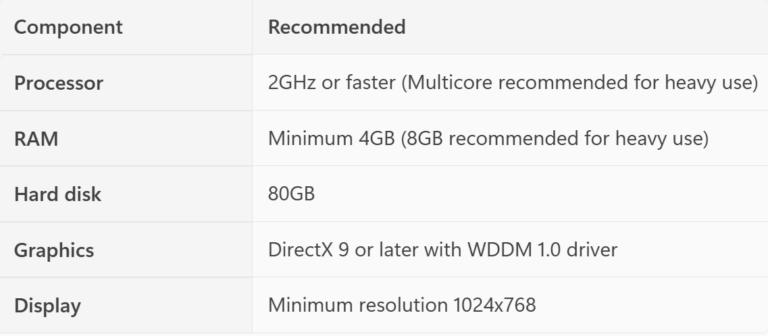
If your computers don’t meet these specifications, purchasing new devices is advisable.
Upgrade Routes Depending on Organisation Size
Small organisations / single users
Always back up files first, and expect to reinstall certain applications that may not be compatible post‑upgrade.
Organisations with a network / domain
Larger organisations
Larger charities and non‑profits benefit from using deployment tools to roll out Windows 10 at scale, ensuring consistency and saving considerable time.
Smartdesc has expertise in:
Special Charity Pricing
Charities and non‑profits can purchase Windows 10 Pro upgrades for just £17 via Charity Digital (assuming minimum hardware requirements are met).
Option 2: Keep Using Windows 7 (Not Recommended)
Continuing to use Windows 7 is highly discouraged, but in some scenarios unavoidable.
This provides temporary protection but should be treated only as a short‑term measure.
Summary: What Charities Should Do Now
Running Windows 7 now puts your organisation at significant risk. Upgrading protects your data, your users, and your compliance standing under GDPR.